
On 1 September 2026 MYOB changed how add-ons are authorised to reach online company files. TransPost versions earlier than 4.1.1 may stop being able to connect at any time, so please install the latest version and re-authorise each company file.
What you need to doImport your data into MYOB AccountRight
- Flexibly – map any CSV or tab-delimited file to the MYOB fields you need
- Effortlessly – no reformatting, no fiddling with MYOB's Data Import
- Automatically – run a whole sequence of imports on a schedule
Works with MYOB Business Lite, Pro, AccountRight Plus and AccountRight Premier.

 MYOB Business Lite and Pro
MYOB Business AccountRight Plus and Premier
MYOB Business Lite and Pro
MYOB Business AccountRight Plus and Premier
Do you or your staff spend many hours entering data into MYOB?
If your data is in a csv or text file importing it into MYOB is easy – TransPost it directly into your MYOB Company file.
- No need to fiddle with the MYOB Data Import function
- Usually no need to fiddle with the data beforehand
- Your data is placed directly into your MYOB file, with full logging so you have a record
These all have the same easy to use interface
They differ in the data types they import, how much they automate, and which versions of AccountRight they support.


$192.50 /year
- Customers data
- Sales Invoices & Orders
- Customer Payments
- Items and Jobs
- Spend Money
Works with MYOB Business, including AccountRight Plus and Premier


$495.00 /year
This additionally imports the following:
- Suppliers
- Purchases
- Supplier Bill Payments
- Inventory Adjustments
- Receive Money
- Timesheets
- General Journals
- Personal cards


$88.00 /year
Import into AccountRight Live
- Customer data
- Sales Invoices
- Customer Payments


$792.00 /year
Manage imports into multiple company files
- Choose between company files as you go
- Or set the selection in Run Schedule or scripts
- Imports all the same data types as TransPost Plus

Coming soon
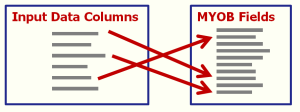
TransPost works out the mapping for you
Upload a file from any computer. TransPost works out which column goes where in MYOB, shows you the transactions before anything posts, and tells you what went in. The mapping you already know sits underneath it.
- Auto mapping
- Ready-made mappings
- Scheduled imports
- Native connectors
Early access is free to join – development updates and beta invitations only.

See the TransPost Product Feature Comparison table for a detailed list of features.
“I just would like to say how thankful I am of your product and your assistance with the setup and initiation. It works perfectly within the system and I can't thank TransPost enough for such a time saving feature! It has cut down a day of inputting”
Watch this video to find out more
All TransPost products work with MYOB Business
Use with MYOB Business Lite, Pro, AccountRight Plus and AccountRight Premier to import into your online company files. On local or offline files? Use TransPost 3.3.7.
Classic AccountRight or offline files? Use TransPost 3.3.7
Version 4 imports into online files only, because that is all MYOB’s online API allows. TransPost 3.3.7 still works with classic AccountRight (MYOB version 19 and earlier) and with offline company files, in all four editions.
3.3.7 is no longer updated, so we can’t fix problems in it, but licences are still available.
Import Data From
…and many more applications and eCommerce systems. Use data exported from Microsoft Access & Excel, MySQL, FileMaker and other databases.