

Every data type, and a way to automate it
TransPost Plus is an extended version of TransPost with the same easy interface. Use it to import a variety of data into MYOB AccountRight from tab-delimited and CSV files.
Free 30 day trial · works with MYOB Business, on Windows and Windows Server.
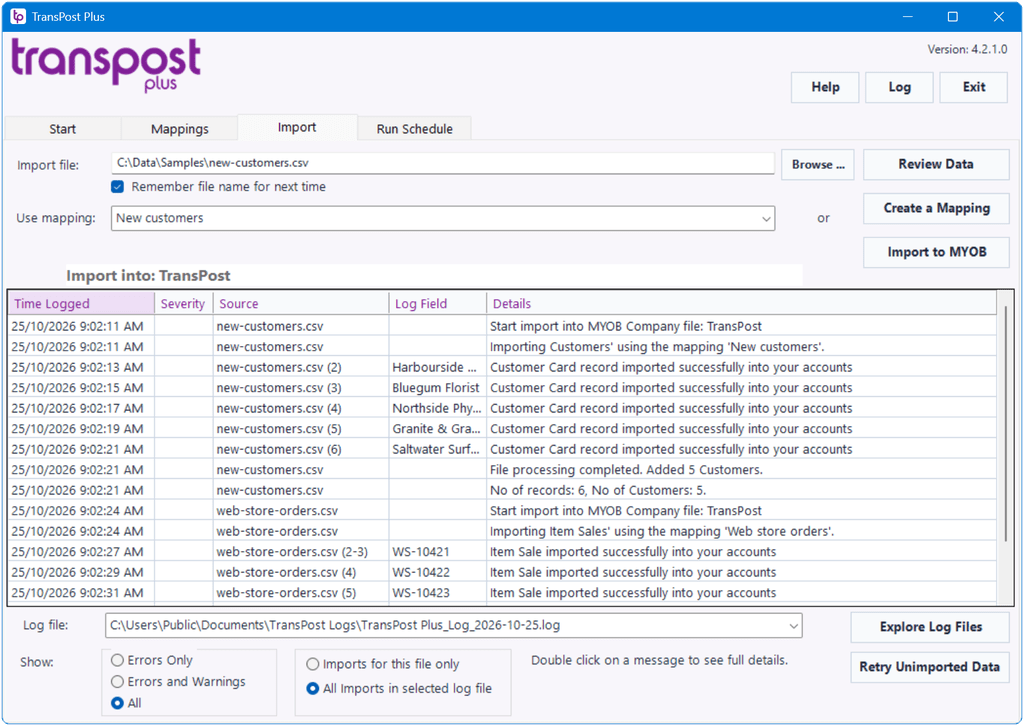
The whole purchase side, plus a way to automate it
TransPost Plus imports many data types into MYOB AccountRight, including Suppliers, Purchases, Bill Payments and Journals.
You can automate the processing using command line scripts or the TransPost Plus Service. As with standard TransPost, all importing is logged so you can check what has been imported.
Import these data types into MYOB
Sales side
- Customer (Insert and Update)
- Sales Invoices and Orders
- Item, Service, Professional Sales
- Miscellaneous and Time Billing Sales
- Customer Payments
- Receive Money
Purchase side
- Suppliers (Insert and Update)
- Purchases Bills and Purchase Orders
- Item, Service, Professional Purchases
- Miscellaneous Purchases
- Supplier Payments
- Spend Money
Everything else
- General Journals
- Items (Insert and Update) and Item Pricing
- Inventory Adjustments
- Jobs and Personal cards
- Timesheets
- Activity Slips (AccountRight Plus and Premier files)
Set defaults for data not available
- Specify a default for any field (even/especially ones not available in the data for import)
- For sales and purchases, many fields default from the customer/supplier card. See here for details.
- Tax codes default from card, item or account as appropriate
- If neither price nor line total supplied, price derived from item data using customers price level and ship quantity as appropriate
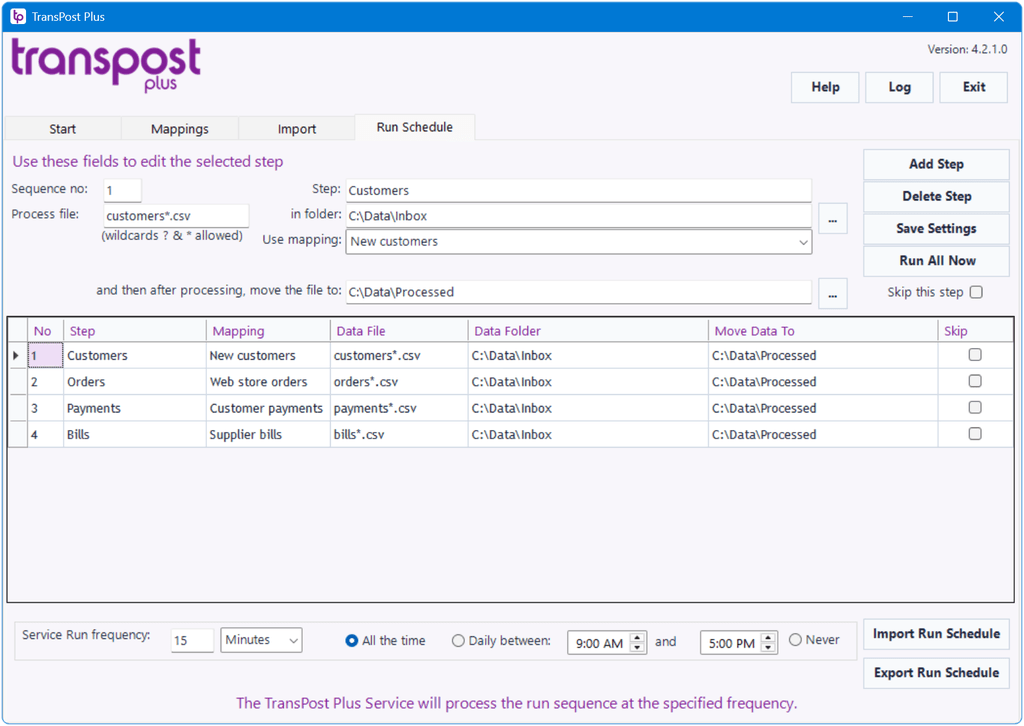
Run it without opening it
- Run import from a simple command line
- Store standard Run Sequence
- Run all files and mappings specified in the Run Sequence – from the application (Run All now), from the start menu, from a command line, or at regular intervals using the service
TransPostPlus_Run.exe "path of input file" "name of mapping"
Pay using PayPal or a credit card
To purchase send a purchase order to sales@transpost.com.au or pay via PayPal.
Note: You do not need a PayPal account as there is a "Pay with a Card" option. The license will be issued immediately to the email address used in the payment process.
| License | Price | Pay via PayPal |
| 1 Year Regular Subscription: | $495.00 AUD (inc $45.00 GST) |
Not sure yet? Would you like to try it out a little longer?
| 60 day Trial Extension Subscription: | $93.50 AUD (inc $8.50 GST) |
After you have bought your license subscription you will receive a license serial number by email. You must register it in the Activation & Registration program for your TransPost or TransPost Plus, which will set the expiry date to the appropriate date after the date on which the subscription is paid.
Renew Subscription
You can renew your subscription instantly via PayPal either using a PayPal account or via the PayPal "Pay with Debit or Credit Card" option. Have your license serial ready to paste in.
Purchases are subject to our licence agreement, terms of sale and privacy policy.
Download TransPost Plus
You need 4.1.1 or later for MYOB's new file authorisation process. 4.2.0.0 supersedes 4.1.1 and is the build to install.
Since 1 September 2026 MYOB has been withdrawing the old authorisation process. Add-on access is now on a file by file basis, so that process has been rewritten at the TransPost end. See here for full details upgrading to 4.2.0.0 and the MYOB authentication changes.
| Version | Released | Download | |
 |
4.2.0.0 | August 2026 | TransPost Plus 4.2.0.0 |
Previous Release
Kept for reference only. Versions earlier than 4.1.1 may lose access to MYOB online files at any time following MYOB's authorisation change on 1 September 2026 – see supported versions.
|
|
4.0.1.937 | October 2024 | TransPostPlus 4.0.1.937 |
| Version | Released | Download | |
|
|
4.0.0.876 | August 2023 | TransPostPlus 4.0.0.876 |
What Changed in version 4
- The Configuration & Activation program has been removed and replaced by options in the main program itself. This removes the need to run a separate program as Administrator to configure files and register or renew a license.
- The lengths of fields such as Invoice number and Job number have been extended to the limits currently applicable in MYOB.
- New Action code - D will delete where that is permissible in MYOB.
- Action code options to modify open sales and convert orders to invoices.
- Foreign currency and stock location have been implemented where the MYOB API permits.
See here for full details Version 4
Version 3.3.7
This version is compatible with MYOB 19 using the old ODBC communication.
| Version | Released | Download | |
|
|
3.3.7.632 | December 2019 | TransPostPlus 3.3.7.632 |
TransPost Plus Upgrades
We publish new versions from time to time with extra features, improvements and fixes to defects. You can upgrade at any time by downloading and installing the new version.
The install of the new version will automatically uninstall the old version. If the TransPost Plus Service is running when you do this it will stop and replace the Service with the new version and provide the option to automatically start the Service for the new version.
If you do not wish to continue using the new version you can download and install an older version back over it.
How to Uninstall TransPost Plus
- Select Uninstall TransPost Plus from the Start menu. Note that it is grouped under TransPost Plus.
- Click Yes to confirm that you wish to uninstall TransPost Plus
- If a "file is in use.." message appears then close TransPost Plus if it is in use and wait a couple of minutes for the TransPost Plus Service to shut down if it was started, then click Retry